Authentication Between TheHive Flow Components#
6.0 One
Every channel between TheHive Flow, TheHive, and the services of the stack carries its own authentication mechanism.
Docker Compose deployment
The settings and procedures below apply to the Docker Compose deployment of TheHive Flow. On a Kubernetes deployment, see Configuration and operations on Kubernetes instead.
The following diagram shows each channel and its mechanism. Blue arrows mark the services TheHive Flow needs to start: Temporal, PostgreSQL, and the blob store. The yellow arrows are used at run time only, when users work in the Flow view or when workflows run. Dashed arrows carry no authentication and rely on the isolation of the thehive-flow-network Docker network.
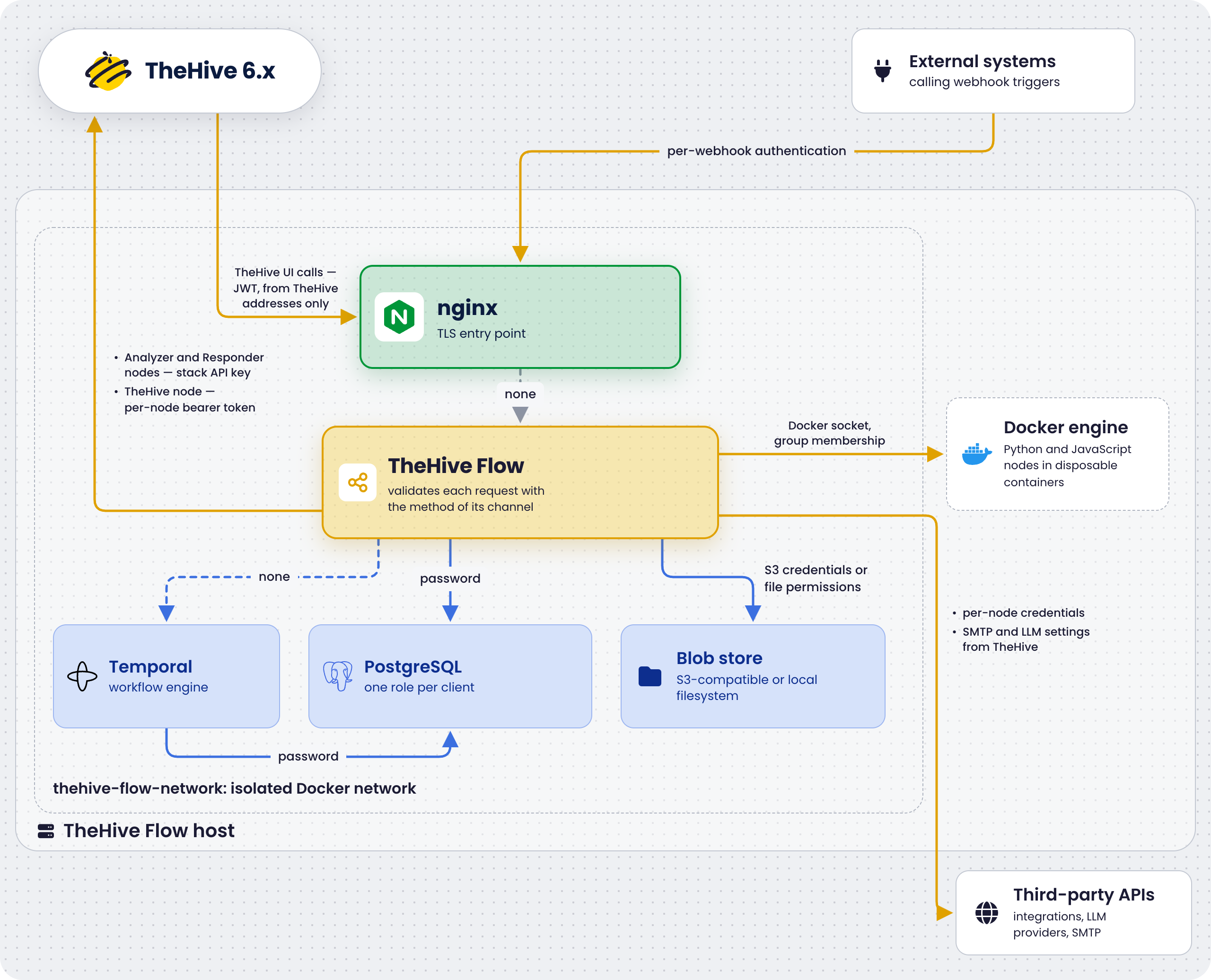
Authentication matrix#
| Channel | Mechanism | Direction | Where configured |
|---|---|---|---|
| TheHive → TheHive Flow | JWT HS256, symmetric | TheHive signs, TheHive Flow validates | jwt_signing_key in the .env file of TheHive Flow, and TH_FLOW_KEY or flow.jwt_signing_key in TheHive |
| External system → Webhook trigger | Per-webhook method: none by default, Basic Auth, header key, or JWT | The caller authenticates each request, unless the method is None | The authentication section of the Webhook trigger |
| TheHive Flow → TheHive, Analyzer and Responder nodes | API key, bearer token | TheHive Flow signs each request | thehive-flow/secret/thehive-api-key, or thehive_api_key in .env |
| TheHive Flow → TheHive, TheHive node | Bearer token set in the node, usually a secret global variable | TheHive Flow signs each request | The Authentication section of the TheHive integration node |
| TheHive Flow → PostgreSQL | Username and password | Connects as the thehive_flow role |
flow_db_password in .env, expanded into the connection string of thehive-flow/config/thehive-flow.yml |
| Temporal → PostgreSQL | Username and password | Connects as the temporal role |
temporal_db_password in .env, rendered into temporal/config/temporal-server.yaml by init.sh |
| TheHive Flow → Blob store | S3 access key and secret with the s3 back end. Filesystem ownership and permissions with the local back end |
TheHive Flow signs each S3 request, or writes as the container user | s3_access_key_id and s3_secret_access_key in .env, or the blobstore.local.path directory |
| TheHive Flow → Docker engine | Membership of the group owning the Unix socket | TheHive Flow starts and removes the code transformation containers | The socket mount and the docker_gid group of the thehive-flow service in docker-compose.yml. See Docker engine access |
| TheHive Flow → Third-party APIs | Per-node method, such as an API key, a bearer token, or Basic Auth | TheHive Flow authenticates each request | The Authentication section of each integration node, or the Authentication option of each HTTP request node |
| TheHive Flow → LLM provider | API key of the provider, when it requires one | TheHive Flow authenticates each request of an AI node | The LLM providers configured in TheHive, which TheHive pushes to TheHive Flow |
| TheHive Flow → SMTP server | SMTP username and password, when the server requires them | TheHive Flow authenticates the session of each Send email node | The SMTP configuration in TheHive, which TheHive pushes to TheHive Flow, or the email server override in thehive-flow/config/thehive-flow.yml |
| TheHive Flow → Temporal | None | Trust through network isolation | The thehive-flow-network Docker bridge |
| Nginx → TheHive Flow | None | Trust through network isolation | The thehive-flow-network Docker bridge |
JWT between TheHive and TheHive Flow#
Both services use the same algorithm: HS256, an HMAC-SHA256 signature with a symmetric key.
- The
init.shscript generates the key withopenssl rand -hex 32and stores it in.envasjwt_signing_key. - The
thehive-flowservice receives it through theBEEFLOW_SECRET_JWT_SYMMETRIC_KEYenvironment variable set indocker-compose.yml. - TheHive must be configured with the same value: through the
TH_FLOW_KEYenvironment variable, or throughflow.jwt_signing_keyin the mountedapplication.confwhen TheHive runs with--no-config.
There's no automated key exchange or rotation protocol. The key is set once at install time and rotated manually. A key you set yourself must be at least 32 characters long.
Tokens expire 1 minute after signing, with a 30-second validation leeway in TheHive Flow. Keep the clocks of both hosts synchronized with NTP: a larger clock skew makes TheHive Flow reject every token as expired.
Common pitfall: Docker Compose environment variable syntax
With the list syntax, quotes become part of the value and cause a token signature is invalid error:
environment:
  - TH_FLOW_KEY="<jwt_signing_key>"
Use the mapping syntax instead, where YAML strips the quotes:
environment:
  TH_FLOW_KEY: "<jwt_signing_key>"
The list syntax also works without quotes:
environment:
  - TH_FLOW_KEY=<jwt_signing_key>
Direct calls to TheHive Flow#
Calling the /api/ paths of TheHive Flow directly, without going through TheHive, isn't a supported integration. The shipped nginx only forwards TheHive requests from the addresses listed in nginx_thehive_addresses in .env: a request from any other address receives a 403 before reaching TheHive Flow. To start workflows from your own systems, use Webhook triggers instead: they enter through nginx on port 443 and carry their own authentication method, independent of the JWT.
TheHive API key#
TheHive Flow uses a bearer token to authenticate the requests that Analyzer and Responder nodes send to TheHive. TheHive Flow reads the token from the BEEFLOW_SECRET_THEHIVE_API_KEY environment variable, filled from thehive_api_key in .env, and falls back to the thehive-api-key file inside the configured secret_path when the variable is empty: /secret in the container, mapped from ./thehive-flow/secret/ on the host.
The TheHive integration node doesn't use this token. It authenticates with the bearer token set in its own Authentication section, usually stored in a secret global variable.
The file contains the raw token, and stays readable by its owner only, like the other secret files of the stack:
printf '%s' '<thehive_api_key>' > ./thehive-flow/secret/thehive-api-key
chmod 600 ./thehive-flow/secret/thehive-api-key
See the secrets inventory.
Whitespace is trimmed from every secret
The loader trims leading and trailing whitespace and newlines from all secrets it resolves, whether from a file or a BEEFLOW_SECRET_* environment variable. This includes the JWT signing key, TheHive API key, and any Docker registry credentials such as passwords and identity or registry tokens. A trailing newline in a secret file is therefore harmless, and a secret value that must contain leading or trailing whitespace isn't supported.
PostgreSQL authentication#
The init.sh script creates the thehive_flow and temporal database roles when they're missing, with the passwords of .env, and aligns the roles with those passwords at each later run. The passwords are stored in .env and in temporal/config/temporal-server.yaml, both readable by their owner only and covered by .gitignore. They're never embedded in tracked configuration files.
Key rotation#
See Rotate secrets for the procedure of each key.